必要なパッケージのインストール
opkg update
opkg install curl msmtp
アプリパスワードの取得
アプリ パスワードを作成、管理するにアクセスし、アプリケーション名を入力すると xxxx xxxx xxxx xxxx のようなアプリパスワードを取得できます。

設定作業
作業ログは以下の様な感じです。sendmail シンボリックリンクは無くても良いです。
/etc/msmtprc と /etc/aliases を後述する内容で編集しています。
OpenWrt login: root
Password:


BusyBox v1.36.1 (2025-04-13 16:38:32 UTC) built-in shell (ash)

  _______                     ________        __
 |       |.-----.-----.-----.|  |  |  |.----.|  |_
 |   -   ||  _  |  -__|     ||  |  |  ||   _||   _|
 |_______||   __|_____|__|__||________||__|  |____|
          |__| W I R E L E S S   F R E E D O M
 -----------------------------------------------------
 OpenWrt 24.10.1, r28597-0425664679
 -----------------------------------------------------
root@OpenWrt:~# ls -al /etc/ssl/certs/ca-certificates.crt
-rw-r--r--    1 root     root        227909 Apr 14 01:38 /etc/ssl/certs/ca-certificates.crt
root@OpenWrt:~# vi /etc/msmtprc
root@OpenWrt:~# vi /etc/aliases
root@OpenWrt:~# chmod 600 /etc/msmtprc
root@OpenWrt:~# ln -s /usr/bin/msmtp /usr/sbin/sendmail
/etc/msmtprc の内容
password には Google アプリパスワードを指定します。Gmail のパスワードではありません。
account default
host smtp.gmail.com
port 587
auto_from off
from your_email@gmail.com
aliases /etc/aliases
tls on
tls_starttls on
tls_trust_file /etc/ssl/certs/ca-certificates.crt
syslog LOG_MAIL
auth on
user your_email@gmail.com
password xxxx xxxx xxxx xxxx
/etc/aliases の内容
default:your_email@gmai.comサンプルコード
パブリックIPを通知するスクリプトは以下の様にシンプルなものを準備しておきます。
#!/bin/sh

# Get public IP
PUBLIC_IP=$(curl -s ifconfig.co)

# Check if IP was retrieved successfully
if [ -z "$PUBLIC_IP" ]; then
  echo "Failed to retrieve public IP"
  exit 1
fi

# Email subject and body
SUBJECT="Subject: OpenWrt Public IP: $PUBLIC_IP"
BODY="Your OpenWrt router's public IP address is: $PUBLIC_IP"

# Send the email
echo -e "$SUBJECT\n\n$BODY" | msmtp your_email@gmail.com
上記スクリプトを cron などで定期実行しても良いのですが、私の場合 openvpn 接続時、切断時にのみ通知してくれればよいので、openvpn の up / down で hook する方式にしました。OpenWrt の Luci UI から [VPN > OpenVPN] を選択し、Edit ボタンをクリックして対象となる設定ファイルを開いたら、例えば以下の様に dev tun の下に記述しておくと分かりやすいかと思います。
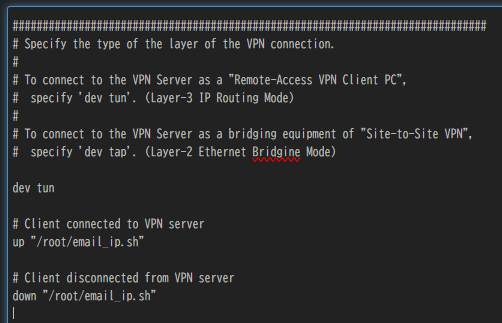
追記内容
# Client connected to VPN server
up "/root/email_ip.sh"

# Client disconnected from VPN server
down "/root/email_ip.sh"
動作確認
VPN 接続時、切断時にメールで public ip ( wan ip ) がメール通知されることを確認します。
私の環境では、IP が通知されることを確認できましたが、VPN 接続前の IP が通知されるのでもう少しオプションを工夫するかスクリプト側を更に工夫してみたいと思います。
参考サイト
駄文置場 – OpenWrt:ブリッジ化したWSR-2533DHP2からGmailにメールを送る
Server Fault – openvpn –client-connect example script
Reference Manual For OpenVPN 2.4 | OpenVPN

コメント